Teleprompter
A minimal floating teleprompter that sits above every other window — Zoom, Keynote, your browser — so you can read your script during a call or recording without staring off to one side.
Overview
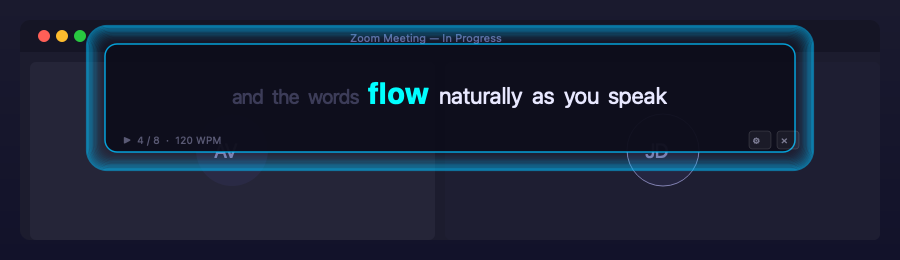
Presenting, recording, or on a video call and need to read from a script without the “clearly reading off-screen” stare? Teleprompter is a small, always-on-top floating window that sits at the top-centre of your screen, above everything else — including full-screen calls — and scrolls your script one word at a time.
Highlights
- Always on top, auto-sized — the window sits above any app and is exactly as wide as it needs to be for the longest page of words; no wasted space, no clipping.
- Word-at-a-time paging — a fixed number of words per view, with the current word highlighted, dimmed history, and upcoming words in a distinct color, flipping to the next page as you cross the boundary.
- Auto-scroll at a configurable pace (default 120 WPM), plus manual step-forward/back and full-page jumps via keyboard or scroll wheel — and manual navigation cleanly pauses auto-scroll rather than fighting it.
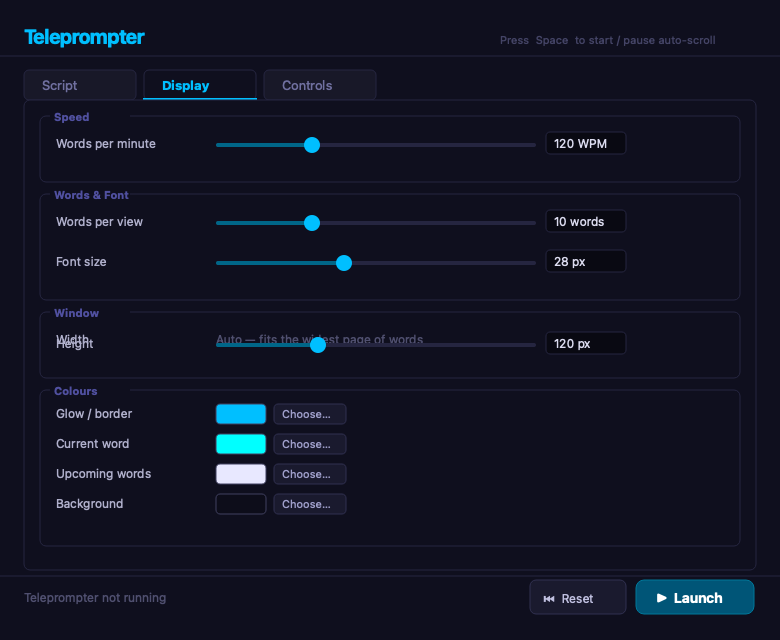
- Fully configurable — speed, words per view, font size, window height, all four colors, and every key binding, persisted automatically to a local settings file.
Stack
Python + PyQt6, packaged with uv, runs cross-platform (built primarily for
macOS, works on Linux/Windows too).